
Raio-X: para onde vai o seu dinheiro
X-Ray: where your money goes
Agrupa gastos e lucros por categoria, com médias e percentuais, no mês ou no acumulado do ano.
Groups spending and profit by category, with averages and percentages, monthly or year-to-date.
Central de Relatórios
Reports Hub
Antes, cada relatório ficava escondido atrás de um ícone dentro do Raio-X. Agora todos moram na Central de Relatórios, alcançável por dois caminhos: Menu → Relatórios ou o mesmo ícone no Raio-X. Os dois levam à mesma tela, com os relatórios do espaço em que você está.
Before, every report was tucked behind an icon inside the X-Ray. Now they all live in the Reports Hub, reachable two ways: Menu → Reports or the same icon in the X-Ray. Both open the same screen, with the reports for the space you're in.
- Extrato do período (Pessoal e Negócios) — quanto entrou, quanto saiu e o que sobrou, no mês, num intervalo de datas livre ou no período todo.
- Statement (Personal and Business) — how much came in, how much went out and what's left, for a month, a free date range or the whole period.
- Vendas por vendedor (Vendas) — quanto cada vendedor vendeu e quanto rendeu de comissão.
- Sales by salesperson (Sales) — how much each salesperson sold and how much commission it earned.
- Recebimentos (Serviços) — quem pagou, quem falta e quanto.
- Receivables (Services) — who paid, who's left and how much.
- Quem está devendo (Vendas e Serviços) — quem te deve, quanto e há quanto tempo, com gráfico.
- Who owes you (Sales and Services) — who owes you, how much and for how long, with a chart.
Todos exportam em PDF; Recebimentos e Quem está devendo também saem como texto pronto para o WhatsApp.
All of them export to PDF; Receivables and Who owes you also come out as text ready for WhatsApp.
O Extrato do Silica Pessoal continua livre, como sempre foi. Os relatórios dos demais espaços — Negócios, Vendas e Serviços — e os relatórios novos são PRO; esses espaços já eram PRO, então ninguém perde o que não tinha. Durante o teste grátis de 7 dias, tudo fica liberado. A central em si é sempre visível: você vê todos os relatórios do seu espaço, com um cadeado nos que são PRO.
The Silica Personal Statement stays free, as it always was. The reports in the other spaces — Business, Sales and Services — and the new reports are PRO; those spaces were already PRO, so nobody loses anything they had. During the 7-day free trial, everything is unlocked. The hub itself is always visible: you see every report for your space, with a lock icon on the PRO ones.
Gastos por categoria
Spending by category
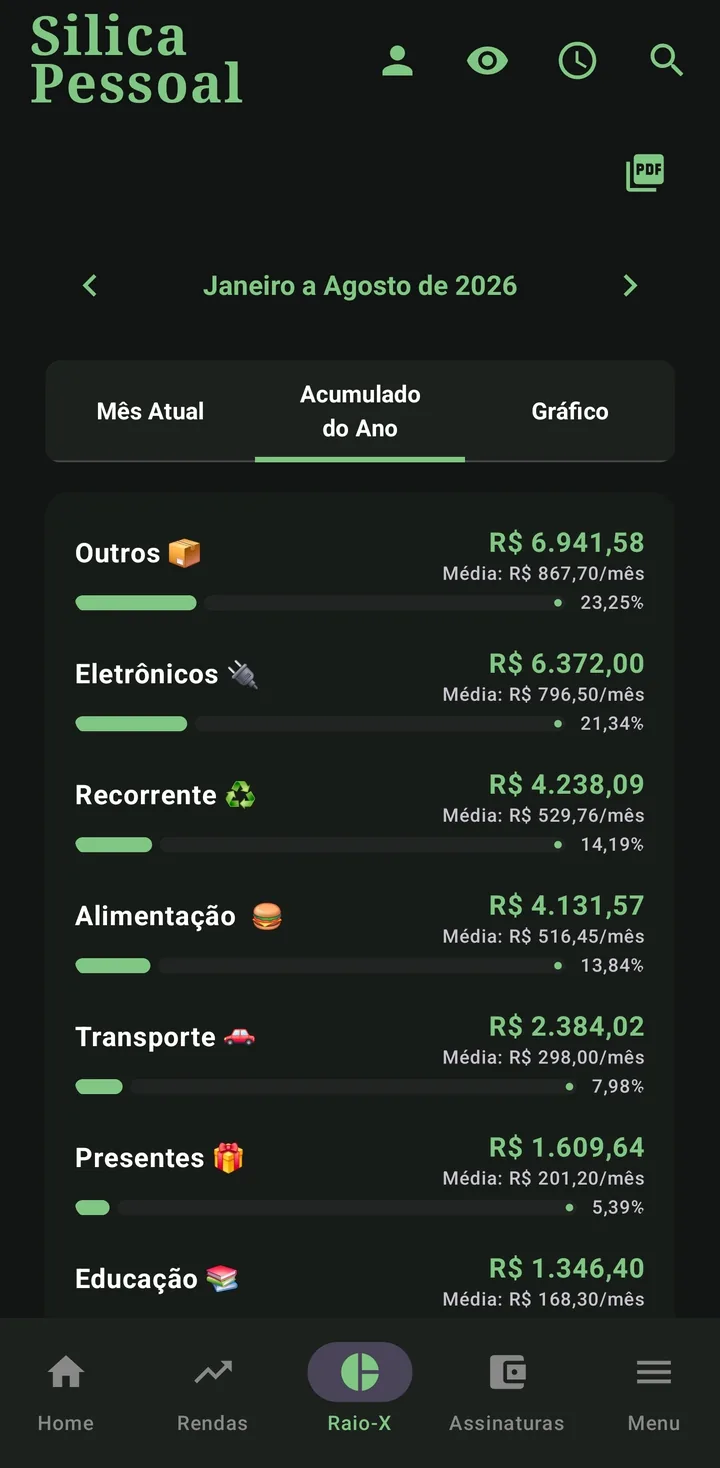
Cada categoria vira uma barra com o total, a média mensal e o percentual do todo. Toque numa categoria (Pessoal/Negócios) ou no nome do Gerente (Vendas) para expandir e ver os lançamentos que compõem aquele valor.
Each category becomes a bar with the total, the monthly average and the percentage of the whole. Tap a category (Personal/Business) or the Manager's name (Sales) to expand and see the entries behind that value.
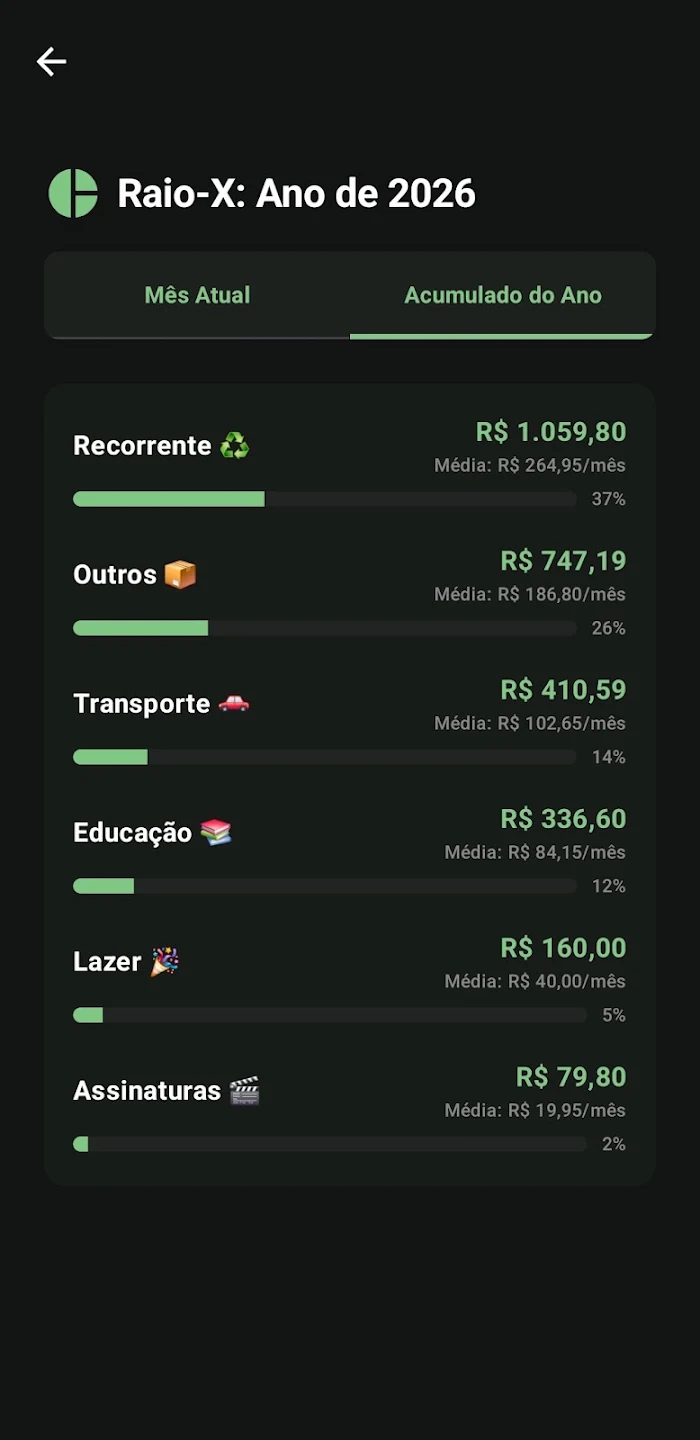
Mês atual vs acumulado do ano
Current month vs year-to-date
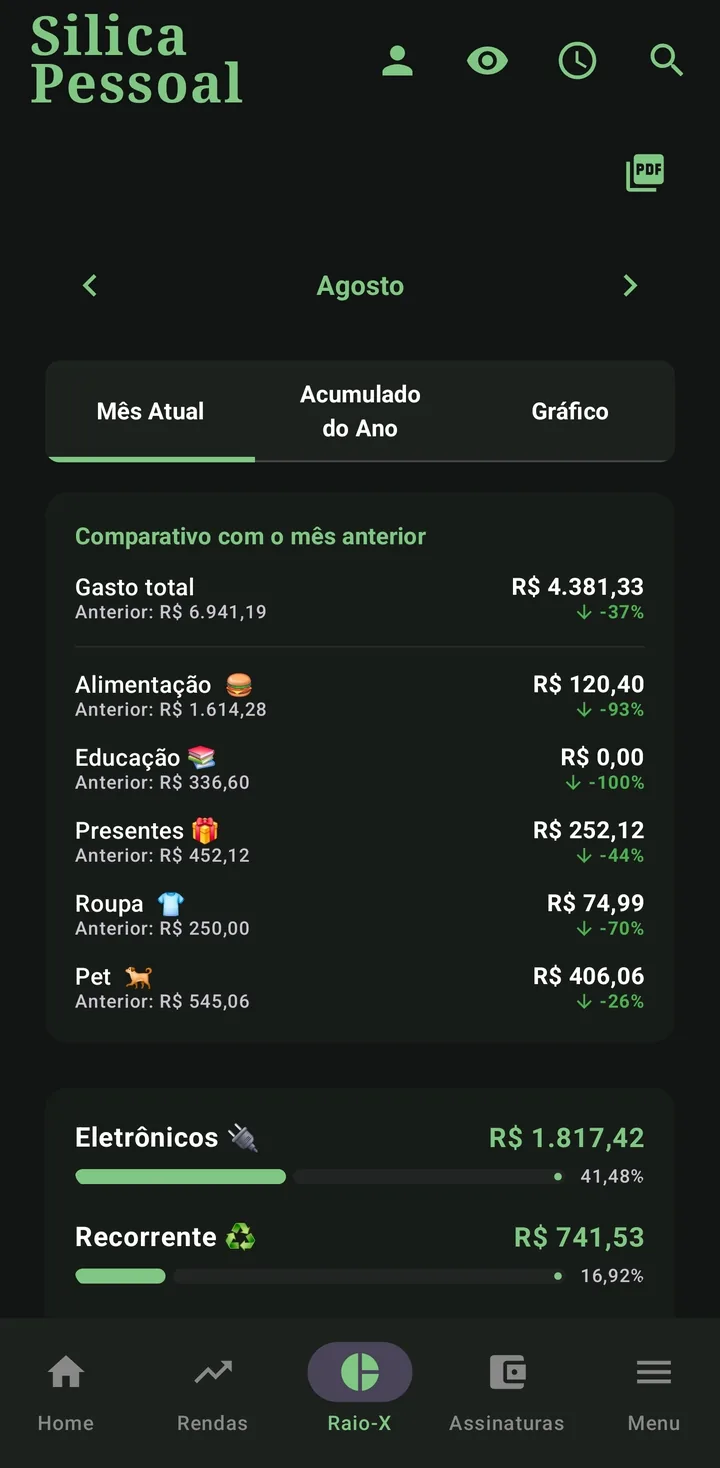
Alterne entre Mês Atual e Acumulado do Ano no topo. Deslize a tela lateralmente para navegar entre os meses sem sair do Raio-X. O mês atual ainda traz o comparativo com o mês anterior, categoria a categoria, com a variação percentual.
Switch between Current Month and Year-to-date at the top. Swipe sideways to move between months without leaving the X-Ray. The current month also brings a comparison with the previous month, category by category, with the percentage change.
No perfil Vendas: ROI & Conversão
In Sales: ROI & Conversion
- ROI: quanto seu dinheiro rendeu sobre o custo do estoque.
- ROI: how much your money earned over the stock cost.
- Conversão em Caixa: quanto do que você vendeu já entrou de fato no caixa.
- Cash Conversion: how much of what you sold has actually reached the cash.
Este Raio-X é agrupado pela data da venda — é desempenho comercial, e um rótulo na tela lembra disso. É diferente do card de vendas na Home, que soma pelas parcelas que vencem no mês (fluxo de caixa): uma venda 3× fechada em janeiro entra inteira em janeiro aqui, mas fatiada em jan/fev/mar lá. Nenhum número está errado — cada tela responde a uma pergunta diferente. Detalhes em Regras de negócio.
This X-Ray is grouped by sale date — it's commercial performance, and a label on screen states that. It differs from the sales card on the Home screen, which sums installments due in the month (cash flow): a 3× sale closed in January lands whole in January here, but split across Jan/Feb/Mar there. Neither number is wrong — each screen answers a different question. Details in Business rules.
No perfil Serviços
In the Services profile
O Serviços tem um Raio-X próprio: recebido no mês, a receber, lucro estimado, ticket médio, faturamento por categoria, mix de formas de pagamento, taxa de conversão de orçamento em serviço e top clientes. Veja em Serviços.
Services has its own X-Ray: month received, to receive, estimated profit, average ticket, revenue by category, payment-method mix, quote-to-service conversion and top clients. See Services.
Quem está devendo
Who owes you
O relatório mais novo da Central, disponível nos perfis Vendas e Serviços: reúne tudo o que ainda falta receber e separa em faixas de atraso — a vencer, até 30 dias, 31 a 60 e mais de 60. É o relatório de "para quem eu ligo hoje".
The newest report in the hub, available in the Sales and Services profiles: it gathers everything still owed and splits it into overdue ranges — not yet due, up to 30 days, 31 to 60 and over 60. It's the "who do I call today" report.
Vem com um gráfico das faixas, na tela e também no PDF — pensado para imprimir bem em preto e branco. Exporta em PDF ou como texto pronto para o WhatsApp.
It comes with a chart of the ranges, on screen and in the PDF too — designed to print well in black and white. It exports to PDF or as text ready for WhatsApp.
Relatório em PDF
PDF report
No perfil Pessoal e no Negócios, a Central abre o Extrato do período: quanto entrou, quanto saiu e o que sobrou, no mês, num intervalo de datas livre ou no período todo, em PDF.
In the Personal and Business profiles, the hub opens the period Statement: how much came in, how much went out and what's left, for a month, a free date range or the whole period, in PDF.
No perfil Vendas, a Central abre o relatório por vendedor numa página só: escolha o vendedor e o período — um mês, um intervalo de datas livre ou tudo — e o % de comissão, e veja o resultado na hora, sem etapas extras. Cada parcela entra no mês do vencimento, separando a comissão já realizada da comissão a receber, com multa e juros por atraso numa linha própria.
In the Sales profile, the hub opens the by-salesperson report as a single page: choose the salesperson and the period — one month, a free date range or all — and the commission %, and see the result right away, with no extra steps. Each installment lands in its due month, separating realized commission from commission to receive, with late fees and interest on their own line.
No perfil Serviços, a Central abre o Relatório de recebimentos: consolidado ou por cliente, num mês, num intervalo de datas livre ou no período todo, em PDF ou em texto para o WhatsApp — com prévia na tela antes de gerar. Só cobranças confirmadas entram; orçamento e OS cancelada ficam de fora. Detalhes em Serviços.
In the Services profile, the hub opens the Receivables report: consolidated or per client, over one month, a free date range or the whole period, as a PDF or as WhatsApp text — with an on-screen preview before generating. Only confirmed charges are included; quotes and canceled orders are left out. Details in Services.
Em Vendas e Serviços, a Central também abre o Quem está devendo, com as faixas de atraso e o gráfico — veja os detalhes acima.
In Sales and Services, the hub also opens Who owes you, with the overdue ranges and the chart — see the details above.